
How Embedded Analytics Solutions Improve SaaS Product Experience


Most SaaS products don’t lose users because they lack features. They lose users because those features don’t translate into clear outcomes.
When users have to export data, switch tools, or wait for reports, they lose momentum. Decisions slow down. Value becomes unclear.
If your users need external tools to understand their own data, your product experience is incomplete.
This is exactly where embedded analytics solutions make a measurable difference by bringing insights directly into the product, where decisions happen.
TL;DR
- Embedded analytics solutions eliminate tool-switching by bringing insights directly into the product
- This leads to faster decisions, higher product adoption, and improved retention
- SaaS products with built-in analytics are more likely to become system-of-record tools
- Without strong data integration, embedded analytics fails to deliver reliable insights
What Are Embedded Analytics Solutions?
Embedded analytics solutions integrate reporting, dashboards, and data insights directly within a SaaS application’s interface.
Instead of users leaving your product to analyze data, analytics becomes part of the workflow.
This transforms your product from a system of execution into a system that supports decision-making.

Why Embedded Analytics Solutions Are Critical for SaaS Products
1. They Eliminate Context Switching
Switching between tools is one of the biggest productivity drains in SaaS environments.
A research done by American Psychological Association found that context switching can consume up to 40% of a person’s productive time
With in-app dashboards, users can access insights without exporting data or relying on external tools. This reduces friction and helps users complete tasks faster.
2. They Enable Faster Decision-Making
When insights are available in real time, users don’t delay action. Embedded analytics ensures that users always have the latest data available, within the same interface where decisions are made.
3. They Improve Product Adoption and Retention
Users stay with products that help them achieve outcomes. By integrating SaaS analytics tools directly into workflows:
- Users see value faster
- Feature engagement increases
- Dependency on external tools decreases
SaaS platforms that integrate analytics into core workflows often see higher feature adoption rates and longer session times, as users no longer rely on external tools for insights.
4. They Simplify User Experience
Traditional analytics tools often require training but embedded analytics does not. Modern user experience analytics focuses on:
- Clean, intuitive dashboards
- Interactive visualizations
- Minimal learning curve
When analytics feels native, users don’t need to “learn” it, they just use it.
According to a PWC study, 32% of customers would leave a brand they loved after just one bad experience.
5. They Create Product Differentiation
In competitive SaaS markets, features alone are not enough.
Analytics becomes the differentiator. Products that provide built-in insights are seen as more complete and more valuable.
This is where platforms like Lumenore fit naturally, combining embedded dashboards with a strong data integration layer, so businesses don’t have to manage multiple tools just to get reliable insights.
How Do Embedded Analytics Solutions Work?
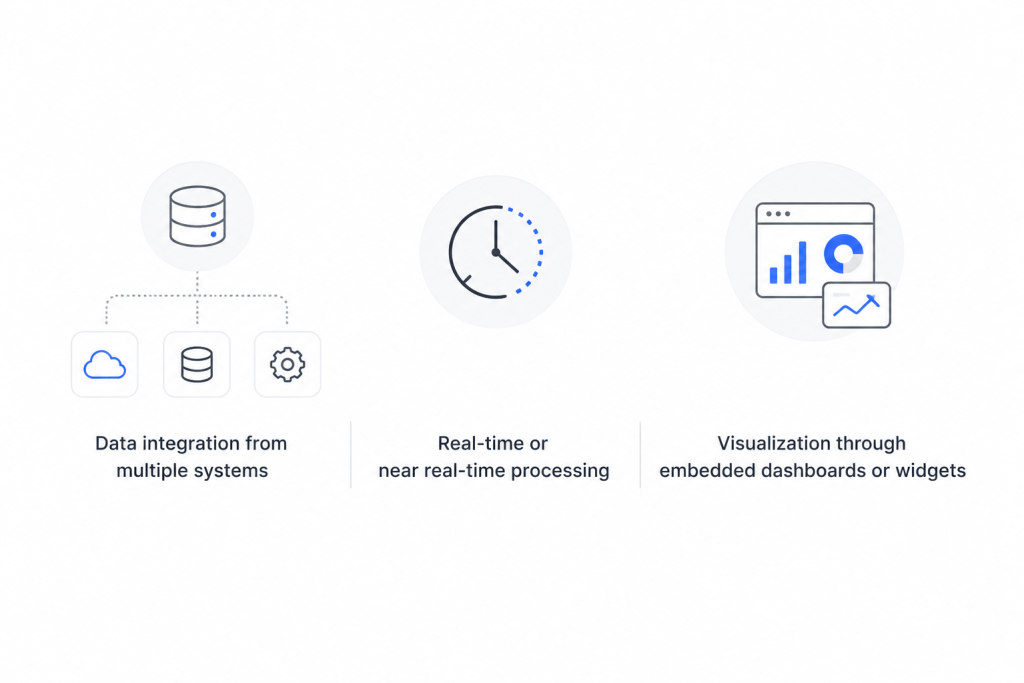
Embedded analytics solutions connect your product’s data sources to a centralized analytics engine, which processes and visualizes data directly inside the application.
This typically involves:
- Data integration from multiple systems
- Real-time or near real-time processing
- Visualization through embedded dashboards or widgets
The key difference is that users interact with insights without leaving the product, making analytics part of the core experience rather than a separate function.
Key Features to Look for in Embedded Analytics Solutions
Real-Time In-App Dashboards
Static reports create delays. By the time users see the data, the moment to act may have already passed.
Real-time in-app analytics dashboards solve this by continuously updating data as it changes. This allows users to monitor performance, detect anomalies, and respond immediately, without waiting for scheduled reports or manual refreshes.
For example, operations teams can track live KPIs, while customer-facing teams can instantly spot engagement drops or spikes.

Self-Service Analytics
Relying on specialists for every query slows down decision-making and creates bottlenecks.
Self-service analytics gives users the ability to explore data on their own by filtering, drilling down, and generating insights without technical support.
This is especially important in SaaS environments where different users have different questions. Business users, product managers, and operators should all be able to interact with data in a way that is intuitive and requires minimal training.
The goal is simple: reduce dependency and increase speed of insight.
Easy UI Integration
Analytics should not feel like a separate tool embedded inside your product. It should feel native.
When integration is done poorly, users experience inconsistent design, slow load times, or disjointed workflows. This breaks the user experience and reduces adoption.
Seamless UI integration ensures that dashboards, charts, and insights align with your product’s design system and user flows. Users should be able to move from action to insight without friction.
This is what makes embedded analytics truly effective: it supports the workflow instead of interrupting it.
Scalable Data Integration
Analytics is only as reliable as the data behind it.
SaaS products often pull data from multiple sources such as CRMs, operational systems, third-party tools, and internal databases. Without a strong data integration layer, this leads to inconsistencies, delays, and fragmented insights.
Scalable data integration ensures that data is:
- Consistent across sources
- Updated in near real time
- Structured for accurate analysis
This is also where many embedded analytics solutions fall short. The front end may look polished, but without robust integration and ETL capabilities, the insights cannot be trusted.
Platforms that prioritize data integration like Lumenore help reduce this complexity by unifying data pipelines and making analytics reliable from the ground up.
This is why many modern analytics platforms prioritize ETL and data pipeline reliability because inconsistent data leads to low trust and low adoption.
How to Implement Embedded Analytics in SaaS (Step-by-Step)
You don’t just plug in dashboards in embedded analytics. It requires aligning data, user experience, and business goals so that insights actually drive action.
Here’s how to approach it:

1. Define the Decisions You Want to Enable
Start with the end goal, not the tool.
Think about what decisions users should be able to make directly within your product. A product manager may need visibility into feature adoption, while a customer success team may need early signals of churn.
When analytics is designed around decisions rather than just data visibility, it becomes immediately useful instead of overwhelming.
2. Identify and Consolidate Data Sources
Most SaaS products rely on data from multiple systems such as application databases, CRMs, and third-party tools.
Before embedding analytics, this data needs to be unified and consistent. If different parts of the product show conflicting numbers, users quickly lose trust.
The goal here is simple: create a single, reliable source of truth that all analytics can depend on.
3. Build a Strong Data Integration Layer
This is the foundation of everything that follows.
A reliable data pipeline ensures that data is collected, transformed, and made ready for analysis without delays or inconsistencies. Without this layer, even the best dashboards will fail because the underlying data cannot be trusted.
This is also where many implementations break down; not at the visualization level, but at the data layer.
4. Design In-App Dashboards Around User Workflows
Analytics should not sit on a separate reporting page. It should exist exactly where users take action.
For example, showing revenue insights inside a billing module or usage trends within a product dashboard makes analytics immediately actionable.
When dashboards are aligned with workflows, users don’t need to switch context; they can move from insight to action in the same place.
5. Enable Self-Service Exploration
Users should be able to explore data on their own without relying on analysts.
This means giving them the ability to filter, drill down, and adjust views in a way that feels intuitive. The focus should be on simplicity that’s powerful enough to answer questions, but easy enough to use without training.
6. Ensure Real-Time or Near Real-Time Updates
Insights lose value when they are delayed.
Depending on your use case, data should update in real time or near real time, so users can respond to changes as they happen. This is especially critical for operational decisions, where timing directly impacts outcomes.
7. Maintain a Consistent User Experience
Embedded analytics should feel like a natural part of your product, not an add-on.
If dashboards load slowly, look visually inconsistent, or interrupt workflows, adoption will drop. A seamless experience ensures that analytics becomes part of everyday usage rather than something users avoid.
8. Monitor Usage and Continuously Improve
Implementation is only the beginning.
Track how users interact with dashboards, what they use frequently, and where they drop off. These signals help you refine both the analytics experience and the product itself.
Over time, embedded analytics should evolve alongside user needs, becoming more aligned with how decisions are actually made.
Where Embedded Analytics Delivers the Most Value
Here’s where Embedded Analytics delivers the most value:
Product Analytics
Embedded analytics gives product teams immediate visibility into how users interact with the product, without relying on separate tools or delayed reports.
Teams can track:
- Feature adoption
- Identify drop-off points in user journeys
- And understand which workflows drive the most engagement
For instance, you can identify that users drop off at a specific onboarding step and immediately test changes to improve conversion.
This makes it easier to prioritize product improvements based on actual usage patterns rather than assumptions.
Customer Experience
Customer experience improves when teams can act on user behavior in real time.
With embedded analytics, support and customer success teams can monitor satisfaction metrics, usage trends, and interaction history directly within the platform. This allows them to respond proactively instead of reactively.
Instead of waiting for periodic reports, teams can identify issues as they happen, whether it’s declining engagement, unresolved tickets, or usage anomalies, and take corrective action immediately.
This reduces response time and helps teams prevent churn instead of reacting after it happens.
Operations
Operational efficiency depends on visibility. Without it, bottlenecks go unnoticed until they become larger problems.
Embedded analytics allows teams to monitor key operational metrics such as:
- Throughput,
- Turnaround time,
- And resource utilization
All within the same system they use daily.
This reduces reliance on manual reporting and enables faster identification of inefficiencies. Teams can quickly pinpoint where delays are occurring and take action before they impact performance or customer outcomes.
Healthcare & Public Programs
In healthcare and public sector programs, delays in data often lead to delayed decisions, and that can have serious consequences.
Embedded analytics enables real-time tracking of resource allocation, and key KPIs directly within operational systems. This helps stakeholders monitor outcomes continuously rather than relying on periodic summaries.
For example, managers can track patient outcomes, service delivery metrics, or coverage gaps in real time, allowing them to adjust strategies quickly and improve overall impact.
Common Mistakes to Avoid
Treating Analytics as an Add-On Instead of a Core Feature
Many SaaS products introduce analytics late in the product lifecycle, often as a reporting layer rather than a core capability.
This approach limits impact. When analytics is not embedded into workflows from the beginning, it feels disconnected and underutilized.
Instead, analytics should be designed as part of the product experience, supporting decisions at every critical step, not just summarizing outcomes after the fact.
Overloading Dashboards with Unnecessary Data
More data does not mean better insights.
A common mistake is trying to show everything at once like multiple charts, excessive metrics, and cluttered layouts. This overwhelms users and makes it harder to identify what actually matters.
Effective in-app dashboards focus on a few key metrics tied to specific actions. The goal is clarity, not completeness. Users should be able to glance at a dashboard and immediately understand what needs attention. Because clarity drives action and clutter delays it.
Ignoring Data Quality and Integration
Even well-designed dashboards fail if the underlying data is inconsistent or incomplete.
When data comes from multiple systems without proper integration, users see conflicting numbers, delayed updates, or missing context. This erodes trust quickly.
A strong data integration layer ensures that insights are accurate, timely, and consistent across the product. Without this foundation, embedded analytics becomes unreliable, regardless of how good the interface looks. If users don’t trust the data, they will stop using the product.
Designing for Analysts Instead of Business Users
Many analytics experiences are built with technical users in mind. This leads to complex interfaces, heavy configurations, and a steep learning curve.
However, most SaaS users are not analysts; they are operators, managers, or decision-makers who need quick answers.
Embedded analytics should prioritize simplicity such as:
- Intuitive navigation
- Clear visualizations
- And minimal setup
The best solutions allow users to explore data naturally, without requiring training or technical expertise.
Conclusion
Embedded analytics is no longer a “nice-to-have” feature. It is a core part of modern SaaS product experience.
When users can access insights instantly, they make faster decisions, see value sooner, and rely more on your product.
If analytics still lives outside your product, you are adding friction that directly impacts adoption and retention.
Key Takeaways
- Embedded analytics solutions turn SaaS products into decision-making platforms
- In-app dashboards reduce friction and increase product stickiness
- Data integration is the foundation. Without it, analytics fails
Start Building a More Insight-Driven Product
If you’re exploring how to integrate analytics into your SaaS product without adding complexity, the next step is to experience how embedded analytics works in practice.
Embed Data with Lumenore
See how embedded analytics works with your own data.Frequently Asked Questions
They integrate dashboards and reporting directly into a SaaS product, allowing users to access insights without leaving the platform.
They reduce tool-switching, provide real-time insights, and make decision-making faster and easier.
No. Mid-sized SaaS products also benefit by improving user engagement and reducing reliance on external tools.
Product analytics tracks user behavior, while embedded analytics delivers broader business insights within the application.
Focus on usability, real-time insights, seamless integration, and strong data connectivity.